A service by IFN Cyber Zone New: Jan Seva Kendra, CSC & CSP software +91 9648186793 care@myifn.in WhatsApp हिंदी IFN Group
Login Free demo हिंदी

+91 9648186793 · care@myifn.in

New Jan Seva Kendra · CSC · CSP software

Your whole Jan Seva Kendra, from one portal

Customers, applications, bills, AEPS banking, wallets, cashbook, staff and QR print — work that today runs on registers, notebooks and memory is recorded and totalled automatically in IFNOne.

26+features in one login
0registers or notebooks needed
1 clickfor bills, reports and WhatsApp
Why you need this portal

The real problem at a Jan Seva Kendra is not the work, it is the accounts

All day long there are applications, AEPS, photocopies and bills. In the evening you don't know how much cash there should be, who owes money, or whose application status to share. IFNOne keeps these accounts automatically as you work.

Now

  • Customers and applications in a register, time wasted searching
  • Guessing cash and wallet after AEPS
  • You have to remember dues, and money gets lost
  • Customers keep calling to ask for status
  • No idea what staff did
  • Profit guessed at month end

With IFNOne

  • Search customers by mobile, full history in one click
  • Cash and wallet balance updated on every transaction automatically
  • Dues list and WhatsApp reminders ready
  • Customers check the status themselves on your page
  • Staff login, permissions, attendance and log
  • Profit & loss report ready every day
Your work, automatic

You make the entry, the portal does the rest

One entry does several jobs at once. No rewriting, no adding up by hand.

Recorded an AEPS withdrawal
  • Cash in hand reduced
  • Wallet balance increased
  • Commission added to income
  • Counted in the staff member's account
Created the bill for the work
  • Automatic bill number
  • Advance credited in the bill
  • Dues in the customer ledger
  • No duplicate bills
Approved the application
  • Recorded in status history
  • Customer's WhatsApp message ready
  • Status updated on the customer page
Customer printed via QR
  • UPI money straight to your account
  • Automatic printing
  • Earnings in the cashbook
Staff logged in
  • Today's attendance marked
  • Only their modules opened
  • Every job recorded under their name
Form filled on the website
  • New lead created
  • You get an alert
  • Added to the follow-up list
Services & features

Everything you get in one portal

6 sections, 26+ features — all in one login, in a panel that works like a mobile app.

Everything on record, from customer to job completion

Customer CRM

Each customer's profile has their bills, work, applications, documents and dues in one place.

Offline Work

Type service charge, government fee, discount and advance — total and dues calculate automatically.

Online Applications

Automatic application number, 9 statuses, full change history and WhatsApp to the customer.

Leads & enquiries

Follow-up dates and reminders; turn a lead into a customer in one click.

Services & Rates

16 common services like Aadhaar, PAN and certificates in one click; rates fill in automatically everywhere.

Where every rupee came from and where it went

GST Bill / Invoice

Multiple items, GST, discount, partial payment. Print, PDF or send on WhatsApp.

Cashbook / Day Book

Separate balance for cash, bank and each wallet, with a running balance.

Customer Ledger

Who owes how much — a complete account by date.

Income & expenses

Commission, rent, electricity, staff salary — record everything and see your profit.

6 types of reports

Profit & loss, daily, banking, dues, staff and service-wise reports.

Complete accounts of AEPS, DMT and wallets

AEPS / DMT transactions

Withdrawal, deposit, Micro ATM, Aadhaar Pay, money transfer — with RRN and commission.

Provider wallets

Live balance, top-up and settlement for every wallet like PayNearby and Spice Money.

Cash reconciliation

Count the notes in the evening; the system tells you whether cash is exact, short or extra.

Account opening records

Complete form with bank branch, nominee and CIF, plus print.

Business bank accounts

Add your accounts; bank balance flows into the cashbook automatically.

Operators do the work, you keep control

Staff login + permissions

Each operator gets only the modules you allow. Money and settings stay hidden.

Attendance

Attendance marked automatically on first login, with a monthly register.

Staff performance

Who handled how much work, applications and banking, and how much commission.

Activity log

Which job was done by whom and when — all recorded.

Your shop online, without a separate website

Your Jan Seva page

Services and fees, government schemes and notices — on one link.

Application status

Customers check status themselves with application number and mobile — no repeated calls.

Online forms

Build a form with your own questions; every submission becomes a lead with an alert.

WhatsApp updates

Application status, work done, dues — ready-made messages in one click.

Customers send files themselves, printing is automatic

QR Auto Print

The customer scans the QR, pays by UPI and the print comes out automatically.

Money straight to your account

No commission. Print earnings go into the cashbook automatically too.

Free tools

Passport photo, ID card print, PDF tools, resume.

A day at the shop

From opening in the morning to the evening accounts

Morning

The operator logs in — attendance is marked. Today's follow-ups and dues show on the dashboard.

All day

Entries for applications, work, bills and AEPS. Cashbook and wallets update with every entry.

Customer arrives

Search by mobile number; old dues and documents appear instantly.

Work done

Change status, WhatsApp message to the customer in one click.

Evening

Count the notes — cash reconciliation tells you if it matches. Daily report ready.
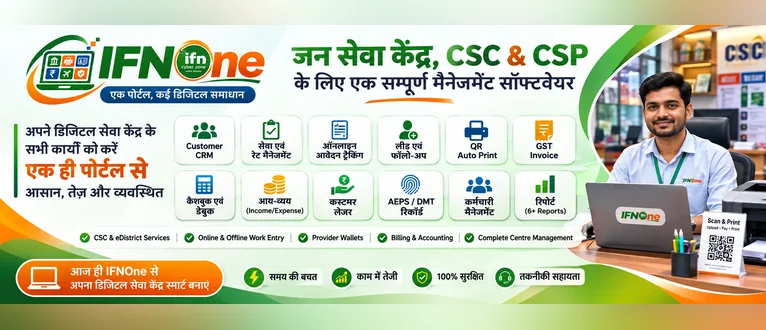
Shop accounts on the IFNOne dashboard
For your customers

Every shop gets its own Jan Seva page

No need for a separate website. Your services, fees, government schemes, notices and online forms on one link — share it on WhatsApp Status and groups.

  • Customers check status with their application number
  • A lead reaches you as soon as the form is filled
  • Print by QR from the same page
  • Protection from captcha and bots
Comparison

Register / Excel vs IFNOne

TaskRegister / ExcelIFNOne
Application number and status Handwritten Automatic number, history, customer page
Due Memory or notebook Customer-wise list, WhatsApp reminders
Cash and wallet after AEPS Guesswork Live balance on every transaction
GST Bill Separate software In one click from work
Control over staff On trust Permissions, attendance, activity log
Profit Guesswork at month end Profit & loss report every day
Customer data Fear of losing it Encrypted, ZIP backup in one click
Security

Your customers' trust is your responsibility — we take care of it

  • Account numbers and Aadhaar saved encrypted; lists show only the last 4 digits
  • Documents in a secure folder, opened only after login, every file checked
  • Confirmation and a log entry when the full number is viewed
  • Staff see only the modules you give; money and settings stay hidden
  • Download all your data as a ZIP any time
Who it is for

For every counter with daily customers

Jan Seva KendraCSC (VLE)CSP / Bank MitraAEPS retailerCyber cafePrint & photocopy shopOnline form centreE-Mitra / Vasudha Kendra

In both Hindi and English. Works on every screen — mobile, tablet and computer — and installs like an app.

New features

Now complete management software — not just a register

From POS billing to passbook slips, insurance to salary — every job of your centre in one portal.

POS billing

Counter billing — tap a tile, get a bill

Your services and rates as tiles, photocopy quantity, ticket and insurance entries, manual items, cash/UPI/credit payment and receipt print or WhatsApp.

  • Save bill with F9
  • Credit and dues
  • Walk-in customer
  • Sales list
IFNOne POS billing
Account passbook slip

A professional slip after opening an account

After opening an account at the CSP / Bank Mitra counter, give a passbook-style slip with bank, branch, IFSC, account and holder details — 3 designs, English/Hindi, your CSP logo, one A4 page.

  • Classic, Modern, Premium
  • Photo and transaction table
  • Aadhaar last 4 digits only
  • PDF / print
IFNOne Account passbook slip
Insurance policies

Premium, payout and renewal — all tracked

Profit on every policy, payout from the company, policy/RC/KYC upload, renewal reminders 30-15-7 days ahead and follow-ups — next year's income secured.

  • Renewal alerts
  • WhatsApp reminders
  • Document upload
  • Profit report
IFNOne Insurance policies
Ticket booking

Train, bus, flight — purchase, sale and profit

Purchase and sale amount, PNR, passengers, ticket copy upload and refunds on cancellation — all linked to the cashbook.

  • Tatkal / hotel / movie
  • Refund accounting
  • Ticket copy
  • Entry from POS
IFNOne Ticket booking
Staff & salary

Attendance, incentives and salary slips

Attendance on staff login, incentives on jobs/applications/banking, advances and deductions, and professional salary slips by WhatsApp/email.

  • Page-wise permissions
  • Monthly salary
  • Bonus/deductions
  • Slip PDF
IFNOne Staff & salary
Day Close

Tally cash in 2 minutes every evening

Count the notes, enter them and the system tells you whether cash matches — the reason for any gap is recorded and a summary sent on WhatsApp.

  • Note-wise count
  • Catch differences
  • WhatsApp summary
  • Reminder
IFNOne Day Close
Website, forms & payments

Customers fill forms and pay online

Your own shop page, form builder, advance payment, time-slot booking, customers check their own status.

  • File upload
  • UPI payment
  • Slot booking
  • Digital card
IFNOne Website, forms & payments IFNOne Jan Seva software on mobile
Loyalty & marketing

Bring customers back

Points on every payment, welcome bonus, WhatsApp auto-messages, Google review QR and rate-card poster.

  • Points as discount
  • Review QR
  • Rate-card poster
  • WhatsApp
IFNOne Loyalty & marketing
IFNOne software for managing Jan Seva Kendra, CSC and CSP work
Billing, cashbook and report features in IFNOneServing a customer with IFNOne at a CSC counter
Install the app

Install on your Android phone and Windows PC

Install IFNOne like an app — its own icon on the home screen or desktop, a separate window and fast start. No Play Store or setup file needed, under 1 MB.

Android phone / tablet

Run your shop on the go — bills, orders, dues and reports on your mobile.

  1. Open ifnone.in in Chrome
  2. Tap "Install app" (or ⋮ menu → Install app)
  3. Open IFNOne straight from the home-screen icon
Android 8+NotificationsOffline entry

Windows computer / laptop

Like desktop software on the counter PC — taskbar icon, POS and live print on the big screen.

  1. Open ifnone.in in Chrome or Microsoft Edge
  2. Click the ⊕ "Install" icon in the address bar
  3. Open IFNOne from the desktop / Start menu
Windows 10 / 11Windows print agentKeyboard shortcuts
Q&A

Questions about the Jan Seva software

No. You still do applications and AEPS on your CSC, bank or provider portal. IFNOne handles their records, bills, dues, cash and wallet accounts, staff and customer updates.

Yes. QR print, UPI payment and free tools are included as before, and print earnings are added to the cashbook automatically.

Yes. Each staff member has their own mobile and password. You decide which modules they can open. Their attendance is marked on first login.

Yes. Turn on GST in settings and enter your GSTIN. Tax invoices are created with GST % on each item, with CGST + SGST.

Yes. These numbers are saved encrypted and appear masked everywhere. Only the owner can view the full number after confirming, and this is logged.

Yes. From the backup page you can download all your data as a ZIP (a separate Excel file for each module) at any time.

You get a free demo as soon as you register, where you can try all modules. Which modules are in which plan is listed on each plan.

Make your centre automatic today

Try every module in the free demo. Setup help on WhatsApp.

IFNOne Logo
Use IFNOne like an app on your phone
Print, Jan Seva office and banking accounts — one tap from your home screen. No Play Store needed, under 1 MB.
How to install